TDLR log + PDF export
The TDLR Log tab is the last step before signing. Filling the Texas 30-Hour Behind-the-Wheel log by hand is tedious and easy to get wrong — rows, categories, minutes, day/night all have to line up. LearnerLog does that accounting for you and shows exactly how many rows in each category still need filling before you can print.
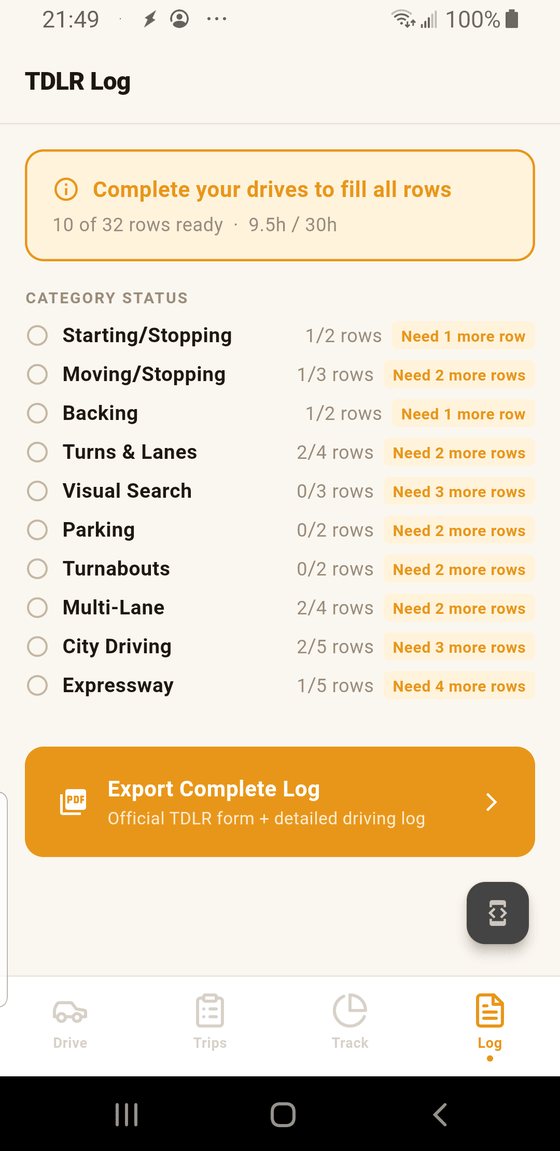
- 1 Overall readiness. Two numbers that matter: how many of the form's 32 rows are ready to print, and how many of the 30 required hours you've logged. Both climb as you keep logging drives.
- 2 Rows filled / rows required. The official form has a fixed number of rows per category (for example, Starting/Stopping needs 2 rows, City Driving needs 5). A row needs a minimum practice duration to qualify. This shows your count.
- 3 Rows-needed tag. Tells you exactly how much is left in that category. Focus your next practice sessions on the categories with the most rows still needed.
- 4 Export Complete Log. Produces a PDF matching the 2015 TDLR form layout, filled in row-by-row with your recorded data, plus a detailed driving log appendix. Tap, save or share, print if your DPS office wants paper.
The 10 categories and their row counts
Texas's 30-Hour Behind-the-Wheel log is organized into 10 practice-activity categories. The minimum rows per category are fixed by DPS; they're the numbers shown on this screen:
- Starting/Stopping — 2 rows
- Moving/Stopping — 3 rows
- Backing — 2 rows (including 30 minutes daytime + 30 minutes nighttime)
- Turns & Lanes — 4 rows
- Visual Search — 3 rows
- Parking — 2 rows
- Turnabouts — 2 rows
- Multi-Lane — 4 rows
- City Driving — 5 rows
- Expressway — 5 rows
Thirty-two rows total. LearnerLog auto-fills each row with a real drive segment that meets the minimum duration for that category.
What the PDF export contains
Tapping Export Complete Log builds two documents in one PDF:
- The TDLR log page. A faithful replica of the 2015 TDLR 30-Hour BTW log — same layout, fonts, and row structure — generated by LearnerLog and filled in row-by-row with your drive data. Each row shows date, minutes, day/night, and a signature line for the supervising driver.
- A detailed driving log. An appendix listing every recorded drive with start/end times and segment-level detail. Useful if a DPS examiner asks to see the breakdown behind the numbers; some offices request it, most don't.
When the PDF is ready, Android's share sheet opens — you can email it to yourself, save to Drive or Files, or send to a cloud printer.
What if a category still shows "Need N more rows"?
That's the normal state until you've logged enough practice in every category. Two ways to close the gap:
- Drive more of that kind of route. Need more Expressway rows? Plan a highway run. Need more Parking? Five minutes in a shopping-center lot counts.
- Add a manual practice activity. For drills GPS can't catch automatically (parking, backing, turnabouts), add them by hand. See the add-activity guide.